A well-organized rack does more than hold receivers, switches, patch panels, and other 19-inch gear. The right setup improves airflow, simplifies troubleshooting, and keeps cables from becoming a tangled barrier to future upgrades.
This roundup covers wall-mounted racks, open-frame options, media cabinets, and dedicated cable managers so you can match storage capacity and cable control to your room, equipment, and installation style.
Best 10 Av Equipment Racks with Cable Management Picks for 2026
Best Wall-Mount Enclosure

- 24-inch-deep steel wall-mount rack
- 180-degree reversible swing gate
- 110-pound capacity with passive cooling
Best For: Small AV or networking closets needing rear cable access
Best Add-On Cable Kit

- Four 1U steel tie bars included
- 24 zip ties and mounting hardware
- Fits standard 19-inch open-frame racks
Best For: Cleaning up cables in an existing rack
Best Covered Horizontal Manager

- Full-metal 1U rack-mount design
- 12 larger cable-routing slots
- Steel cover for contained organization
Best For: Horizontal cable routing in standard 19-inch racks
Best Higher-Capacity Open Rack

- 9U wall-mount capacity for 19-inch equipment
- 200-pound support rating
- Open airflow design with cable-organization points
Best For: Growing medium-sized AV or networking installations
Best Overall

- Five tiers and adjustable shelves for flexible component storage
- Cable-routing holes and hidden compartments reduce clutter
- Grille door, airflow, and lockable wheels suit home AV setups
Best For: Residential entertainment centers, gaming rooms, and small studios
Best Compact Rack

- 6U open frame supports airflow and easy equipment access
- Rack rails accommodate standard 19-inch equipment
- Cold-rolled steel frame includes installation hardware
Best For: Home networks, desktop AV racks, and small studios
Best Cable Organizer

- Four 1U panels add multiple cable-routing points
- Twenty-four slots per panel organize many cables
- Metal construction and included mounting hardware support rack installation
Best For: 19-inch server, network, and AV cabinets needing cable cleanup
Best Wall-Mount Rack
NavePoint 15U Hinged Server Rack
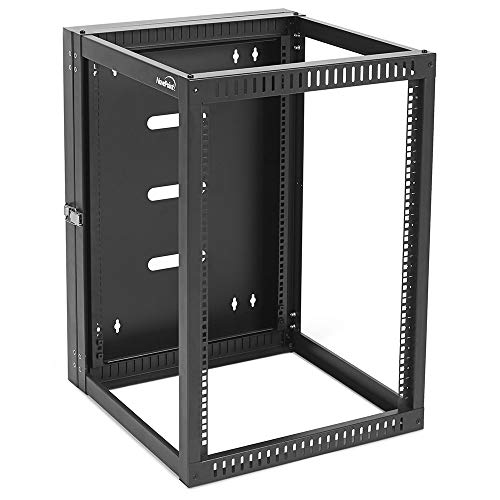
- 15U wall-mounted design for 19-inch equipment
- Hinged rear frame improves service access
- Open frame promotes airflow
Best For: Space-conscious AV, server, and network installations
Best Covered Cable Manager
Tecmojo 1U Horizontal Cable Manager

- Two-pack of 1U rack cable managers
- Twelve slots plus two rear access points
- Removable cover supports easy cable changes
Best For: Compact horizontal cable routing in 19-inch racks
Best Brush Panel

- Two-pack for standard 19-inch racks
- Nylon brush supports cleaner cable entry
- Steel panel includes versatile mounting hardware
Best For: Cable pass-throughs in AV, IT, and network cabinets
Best Wall-Mount Enclosure – NavePoint 6U Swing-Gate Rack
For AV equipment racks with cable management in a compact room or closet, the NavePoint 6U combines a wall-mount format with a hinged front gate for easier rear-panel access. Its 24-inch depth accommodates standard 19-inch equipment and provides room to route cables behind mounted components.
Best For: Small server rooms, data closets, and AV installations needing a deeper wall-mounted rack with service-friendly access.
Pros:
- Supports up to 110 pounds and fits standard 19-inch equipment.
- Dual-hinged front gate opens 180 degrees from either side and can be removed.
- Open-frame design promotes passive cooling and includes flexible square and threaded rack holes.
Cons:
- Its 24-inch depth may extend farther from the wall than shallower racks.
- At 6U, it offers less vertical capacity than a 9U option.
The swing gate and reversible hinge setup make this a practical choice when cable access and maintenance matter. Choose it when depth and rear access are more important than maximum rack capacity.
Best Add-On Cable Kit – ECHOGEAR Rack Tie Bar Kit
The ECHOGEAR kit is a straightforward way to improve cable management in AV equipment racks with cable management needs. It includes four 1U steel tie bars, zip ties, and mounting hardware, allowing cables to be secured at the front or rear of a standard 19-inch rack.
Best For: Existing open-frame racks or enclosures that need flexible horizontal cable routing without replacing the rack.
Pros:
- Includes four tie bars, 24 zip ties, eight cage nuts, and eight screws.
- Universal design fits standard 19-inch open-frame racks and enclosures.
- Ten slots per bar support flexible cable positioning on either rack side.
- All-steel construction has a black finish and includes a five-year warranty.
Cons:
- It is a cable-management accessory, not a rack or enclosure.
- Designed for open-frame racks and enclosures rather than a complete enclosed solution.
Because the bars can mount on either side, this kit works well for tailoring cable paths around different AV layouts. It is especially useful when the rack itself is suitable but its cable routing needs cleanup.
Best Covered Horizontal Manager – JINGCHENGMEI 1U Cable Manager
For a more structured approach to AV equipment racks with cable management, this 1U horizontal manager uses a steel finger duct and cover to organize cables behind rack equipment. Its 12 larger slots support horizontal routing while the full-metal construction adds a sturdier alternative to plastic cable managers.
Best For: Standard 19-inch racks where a covered, horizontal cable-management panel is preferred.
Pros:
- Fits standard 19-inch racks and occupies 1U.
- Full-metal steel construction with powder coating.
- Twelve larger slots help organize and support cables horizontally.
- Includes a cover for a more contained cable path.
Cons:
- The manager uses one full rack unit of vertical space.
- It is supplied disassembled and requires assembly.
This manager is a good fit when cable organization should look contained rather than simply tied in place. Its 2.75-inch depth gives cables a defined horizontal channel while preserving compatibility with standard rack layouts.
Best Higher-Capacity Open Rack – NavePoint 9U Wall-Mount Rack
The NavePoint 9U is a practical option for AV equipment racks with cable management when you need more vertical capacity in a wall-mounted format. Its open design improves airflow and access, while built-in slots and cable-organization points help keep wiring orderly around installed equipment.
Best For: Medium-sized AV or networking setups that need 9U of capacity and a 200-pound wall-mounted support structure.
Pros:
- Provides 9U of space for standard 19-inch rack equipment.
- Supports up to 200 pounds and uses sturdy 1.5mm cold-rolled steel.
- Open construction improves airflow and makes equipment and cables easier to reach.
- Includes slots and points intended for cable organization.
Cons:
- It arrives flat-packed and requires assembly.
- The open-frame design provides less enclosure coverage than a closed rack.
- Its listed depth is 16 inches, limiting compatibility with deeper equipment.
With more capacity than a 6U rack and a higher stated load rating, this model suits growing wall-mounted systems. Confirm equipment depth before buying, especially when installing larger AV or network components.
Best Overall – 5-Tier AV Media Cabinet
This 5-tier cabinet is a practical choice among AV equipment racks with cable management for living rooms, gaming spaces, and studios. Its adjustable shelves, hidden storage, cable-routing holes, grille door, and lockable wheels combine equipment organization with a furniture-style walnut finish.
Best For: Home entertainment setups needing enclosed storage, airflow, and easy repositioning.
Pros:
- Five tiers with three height-adjustable shelves accommodate varied AV components.
- Built-in cable-routing holes help keep connections organized.
- Grille door design promotes airflow while the hidden compartments reduce visible clutter.
- Four smooth-rolling, lockable wheels support flexible placement.
Cons:
- Engineered-wood construction may be less suitable for heavy commercial equipment than a steel rack.
- Its furniture-style design is freestanding rather than a standard 19-inch rack enclosure.
Choose this cabinet if appearance, concealed storage, and mobility matter as much as cable organization. It is particularly well suited to residential AV systems and small studio environments.
Best Compact Rack – 6U Open Frame Network Rack
For compact installations, this 6U open-frame unit is a straightforward option among AV equipment racks with cable management. The metal frame provides access and airflow for networking, audio, video, and other standard 19-inch rack-mount equipment in a home or small studio.
Best For: Desktop or small-room installations that need accessible 19-inch rack mounting.
Pros:
- Open-frame construction supports easy equipment access and enhanced airflow.
- Rack rails on all sides allow flexible installation and future expansion.
- Heavy-duty cold-rolled steel provides a sturdy equipment-supporting structure.
- Included mounting hardware simplifies setup with standard 19-inch equipment.
Cons:
- The 6U capacity limits the amount of equipment compared with larger racks.
- Open construction offers less concealment and protection from dust than an enclosed cabinet.
- The supplied notes identify cable-management capability but do not specify integrated cable-routing accessories.
This rack makes sense when accessibility and ventilation take priority over concealed storage. Its compact 6U format is appropriate for a focused home network, audio, or AV installation.
Best Cable Organizer – 1U 24-Slot Brush Panels
These four 1U brush panels are a useful add-on for AV equipment racks with cable management, especially when an existing cabinet needs cleaner cable entry and exit points. Each metal panel has 24 slots designed to organize multiple cables while helping maintain airflow and reduce openings for dust and dirt.
Best For: 19-inch rack cabinets that need added horizontal cable organization.
Pros:
- Four panels provide multiple cable-management points across a rack installation.
- Twenty-four slots per panel help arrange numerous cables neatly.
- Metal construction is described as durable, rust resistant, and firmly made.
- Included screws and nuts support straightforward screw-in installation.
Cons:
- This is a cable-management accessory, not a standalone equipment rack.
- Each panel uses 1U of rack space, reducing space available for equipment.
- Its 19-inch rack format may not fit nonstandard cabinets.
Consider this four-pack when your rack already has mounting space but needs a more orderly cable path. The brush-slot design adds a clean finishing panel without requiring a complete rack replacement.
Best Wall-Mount Rack – NavePoint 15U Hinged Server Rack
For buyers seeking AV equipment racks with cable management, the NavePoint 15U rack combines wall-mounted installation with a hinged rear swing frame for easier access to connected equipment. Its open four-post design also supports airflow and organized installation in space-limited areas.
Best For: Offices, network closets, classrooms, and retailers needing a wall-mounted rack for 19-inch AV, server, or networking equipment.
Pros:
- 15U capacity accommodates standard 19-inch equipment, with a maximum listed load of 110 pounds.
- Hinged rear frame swings open for easier installation and maintenance access.
- Symmetric construction allows the hinge to be assembled on either the left or right side.
- Numbered cage-nut rails help streamline equipment installation.
Cons:
- Its 24-inch-deep wall-mounted form may require substantial wall space and mounting support.
- The open-frame design offers less enclosure than a fully enclosed cabinet.
This rack is a practical choice when rear access and airflow matter as much as capacity. Verify wall construction, equipment depth, and mounting requirements before installation.
Best Covered Cable Manager – Tecmojo 1U Horizontal Cable Manager
For AV equipment racks with cable management, the Tecmojo 1U horizontal manager provides a compact way to route and separate cables across a standard 19-inch rack. Its removable cover and multiple access points make changes easier while keeping bundles organized.
Best For: Home offices, studios, and AV, IT, data, audio, or network cabinets that need horizontal cable organization.
Pros:
- Includes two 1U cable managers for organizing cables across multiple rack positions.
- Twelve slots and two rear access points help separate and route cable bundles.
- Removable top cover simplifies adding or removing cables.
- Includes hardware for both 12-24 cage-nut and 10-32 screw installations.
Cons:
- The 2.6-inch depth provides less routing space than a deeper manager.
- Plastic construction may not suit buyers seeking an all-metal cable-management accessory.
This two-pack is a useful add-on for racks that need clean horizontal routing without taking much vertical space. Check available 1U positions and cable bundle size before ordering.
Best Brush Panel – Tecmojo 1U Rack Brush Manager
The Tecmojo brush panel is a simple solution for AV equipment racks with cable management, allowing cables to pass through a 1U opening while the high-density nylon brush helps limit open gaps. Its steel panel fits standard 19-inch server racks and network cabinets.
Best For: IT, data, networking, AV, studio, and office racks that need a brush-style cable entry.
Pros:
- Two-panel pack fits standard 19-inch racks and cabinets.
- High-density nylon brush organizes cable entry while helping reduce dust buildup.
- Brush opening preserves airflow through the cable pass-through area.
- Includes mounting screws for square and tapped rack holes.
Cons:
- A brush panel manages cable entry but does not provide enclosed horizontal routing or bundled separation.
- Its 1U format uses rack space for a pass-through panel rather than equipment.
This is a focused accessory for routing cables through a rack while maintaining a cleaner opening than an uncovered gap. Pair it with horizontal managers when you need more structured cable organization.
How We Picked the Best Av Equipment Racks with Cable Management
We focused on products that support practical AV installation needs: compatibility with standard 19-inch equipment, usable rack height, mounting or placement flexibility, cable-routing options, and access for installation and maintenance. The selection includes complete racks as well as cable-management panels and tie bars that can improve an existing rack.
We also considered depth and enclosure style. Wall-mounted racks save floor space, open-frame racks provide quick access and ventilation, and furniture-style cabinets are better suited to living rooms where appearance matters as much as equipment capacity.
Quick Comparison
- Best for compact wall installations: A 6U or 9U wall-mount rack.
- Best for larger systems: A 15U, 24-inch-deep wall-mount rack.
- Best for airflow and accessibility: An open-frame rack.
- Best for living spaces: A 5-tier AV media cabinet.
- Best for improving cable routing: Horizontal managers, brush panels, and tie bars.
Key Buying Factors for Av Equipment Racks with Cable Management
Rack Size and Weight Capacity
Rack height is measured in U, with each rack unit equal to 1.75 inches. Count the equipment you have now, then allow room for power distribution, ventilation, and future additions. Confirm the rack’s stated load capacity and use appropriate hardware for wall construction.
Depth and Equipment Fit
Measure the actual depth of your deepest component, including connectors and rear cable bends. A rack listed as 16 or 24 inches deep may provide less usable clearance once doors, rails, and cable-management hardware are installed.
Access, Airflow, and Protection
Open frames are easy to service and typically ventilate well, while enclosed or hinged designs offer more protection and a cleaner appearance. For heat-producing amplifiers, receivers, and networking gear, leave ventilation space and avoid blocking fans or vents.
Cable Routing and Serviceability
Horizontal managers, tie bars, and brush panels help separate signal, power, and network cables. Look for removable covers, generous openings, strain relief, and enough rear clearance to unplug equipment without dismantling the rack.
Who Should Buy Which Av Equipment Racks with Cable Management?
Choose a compact wall rack if you need to mount a modem, switch, patch panel, or small AV system without using floor space. Select a deeper, higher-capacity wall rack when your setup includes multiple components or requires room behind the equipment. An open-frame rack is a practical choice for utility rooms, studios, and test benches where fast access is more important than appearance.
For a lounge or media room, a multi-tier AV cabinet can blend more naturally with furniture while keeping components accessible. If you already own a compatible rack, dedicated 1U cable managers, brush panels, or tie bars may deliver the biggest organizational improvement at the lowest cost. In every case, verify dimensions, mounting hardware, ventilation needs, and total equipment weight before buying.